
Tags
Various text interfaces within the Geometry Dash client can be manipulated using special tags similar to markup languages such as HTML. Geometry Dash has 4 primary types of tags:
- Colour Tags
- Fade Tags
- Delay Tags
- Shake Tags
Colour Tags
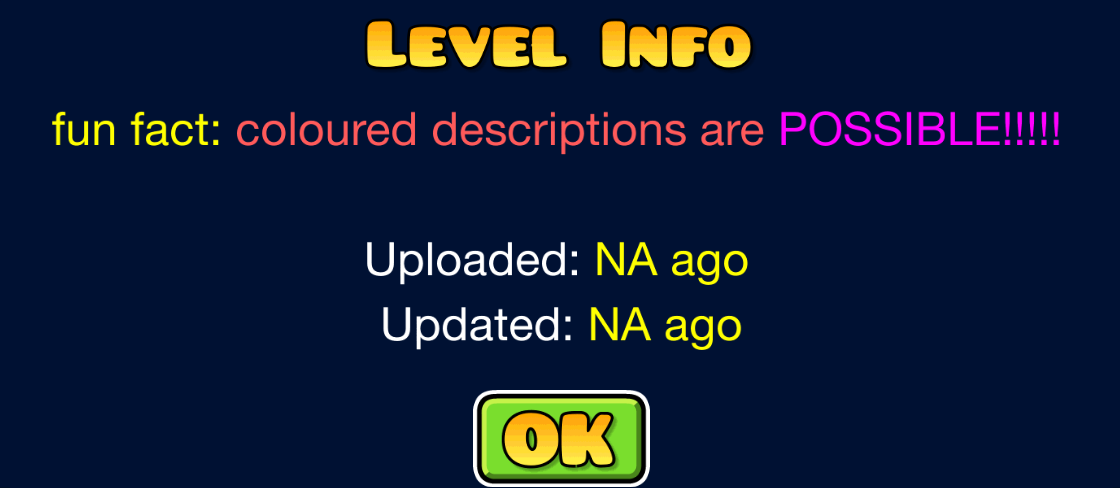
Colour Tags are used to style areas of text with colour. They contain both a start and an end tag - the start tag defining which colour should be rendered on screen and the end tag denoting when to stop reading.
Usage: <cl>Coloured Text!</c>
| Tag | Colour code | Example (website only) |
|---|---|---|
<cb> | 0x4A52E1 | |
<cg> | 0x40E348 | |
<cl> | 0x60ABEF | |
<cj> | 0x32C8FF | |
<cy> | 0xFFFF00 | |
<co> | 0xFF5A4B | |
<cr> | 0xFF5A5A | |
<cp> | 0xFF00FF | |
<ca> | 0x9632FF | |
<cd> | 0xFF96FF | |
<cc> | 0xFFFF96 | |
<cf> | 0x96FFFF | |
<cs> | 0xFFDC41 | |
<c> | 0xFF0000 |
Instant/Fade Tags
Fade Tags are used to fade in a block of text on screen instead of making it appear character by character. Similarly to colour tags, Fade tags have a start and end tag to denote which piece of text should appear instantly. The number is specified in centiseconds, which is 1/100th of a second.
Usage: Hello, <i100>world!</i>

Delay Tags
Delay tags are used to create a delay before a specific string in dialog boxes. The game detects a Delay Tag if the string contains a <d and then it reads the next 3 characters and converts them into an integer. This value is then passed into the CCDelayTime class from the cocos2d-x engine which Geometry Dash uses. The number is specified in centiseconds, which is 1/100th of a second.
Usage: uhh<d030>.<d030>.<d030>.

Shake Tags
Shake Tags are used to render shaky text on screen. The number denotes the intensity of the shake.
Usage: <s260>CHOPPER!</s>

Notes
In 2.1, failing to add an end tag for Colour tags and Instant tags would result in the game crashing, but this was fixed in 2.2
In 2.1, the Fade tags actually made the block of text appear instantly, and so no number was required. To emulate the old behavior, you can use
<i000>Only Colour tags are usable without modifying the client - via level descriptions and comment bans
The tags are defined within the
MultilineBitmapFontclass and are sometimes disabled within the create method using a bool